
Checkout and coupons
How loyalty appears in the cart, and how a coupon is held and then spent.
The division of labour
Section titled “The division of labour”We do not touch your cart. We tell you what a member holds and record what they spent; your checkout does the arithmetic and owns the final price.
| Us | You |
|---|---|
| Which coupons this member has | Applying the discount to the cart |
| Whether a coupon is valid right now | Showing it in the cart UI |
| Holding a coupon so it is not double-spent | Deciding what the customer pays |
| Recording redemption when the order lands | Tax, shipping, rounding |
What this looks like
Section titled “What this looks like”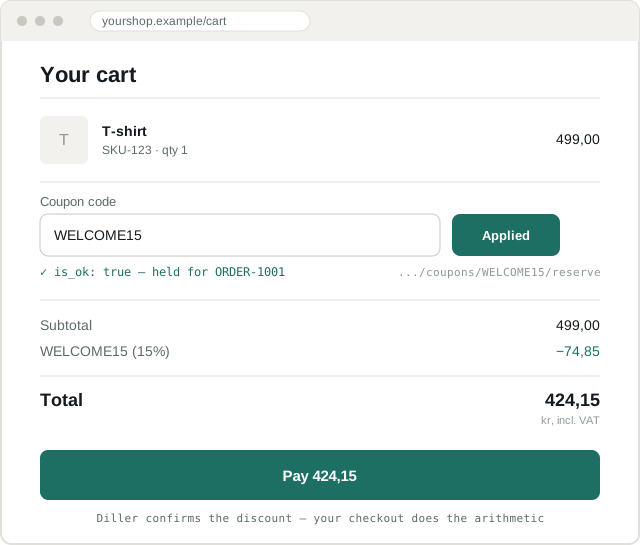
The numbers are the exact ones from the line-item example below — 499,00 minus a 15% (74,85) discount is 424,15. We confirmed the coupon was reservable; your checkout did the subtraction.
The full checkout sequence
Section titled “The full checkout sequence”Posting the transaction releases the reservation for you. The one you have to release yourself is the order that never completes — and the hardest case is the customer who simply leaves, because nothing tells you they have.
Listing a member’s coupons
Section titled “Listing a member’s coupons”GET /api/v2.0/stores/{storeId}/members/{memberId}/coupons/[ { "id": 0, "external_ids": [], "code": "WELCOME15", "title": "15% off your first order", "description": "Welcome to the club", "valid_from": "2026-01-01T00:00:00", "valid_to": "2026-12-31T23:59:59", "type": "Welcome", "discount_type": "Percentage", "discount_value": 15.0, "max_redemptions": 1, "times_redeemed": 0, "product_ids": [], "image_url": null }]Rendering
Section titled “Rendering”max_redemptions - times_redeemedis how many uses are left. Zero means spent — hide it or grey it out.max_redemptionsis nevernull. On a member’s coupon list, an unlimited coupon carries10000000. Treat that as unlimited and show no count, or the customer reads “9,999,999 uses left”.product_idsnon-empty means the coupon only applies to those SKUs. An empty array means the whole order.- Check
valid_from/valid_toagainst the store’s timezone (time_zoneon the store object), not your server’s. The loyalty panel recipe shows how.
Validating
Section titled “Validating”Before you show a discount as applied, confirm the member may actually use it right now.
GET /api/v2.0/stores/{storeId}/members/{memberId}/coupons/{couponCode}/validate{ "is_ok": true, "details": "" }is_ok: false comes with a reason in details — show it rather than a
generic failure.
Validate at two moments: when the customer applies the coupon, and again immediately before payment. Carts sit open for a long time and a coupon can expire in between.
Reserving
Section titled “Reserving”A reservation holds a coupon against one pending order so it cannot be spent twice — in another tab, on another device, or in a physical store.
POST /api/v2.0/stores/{storeId}/members/{memberId}/coupons/{couponCode}/reserve{ "channel": "OnlineStore", "external_product_id": "SKU-123", "external_transaction_id": "ORDER-1001"}| Field | Notes |
|---|---|
external_transaction_id | Required. Your order id. The same one you will post as the transaction’s external_id |
channel | "OnlineStore" |
external_product_id | Optional — for a coupon tied to one line |
Reserve immediately before taking payment, not when the coupon is applied. A reservation does not expire, so one made when the customer first clicks “apply” is held for as long as they browse — and for good if they leave.
Releasing
Section titled “Releasing”POST /api/v2.0/stores/{storeId}/members/{memberId}/coupons/{couponCode}/cancel-reservation{ "external_transaction_id": "ORDER-1001" }What releases a reservation:
| Outcome | What to do |
|---|---|
| Order completed | Nothing — posting the transaction releases it |
| Order cancelled after posting | Nothing — cancelling the transaction releases it |
| Payment failed | Call cancel-reservation |
| Cart abandoned at the payment step | Call cancel-reservation — this is the one that leaks |
A failed payment usually comes back to you as a callback or a redirect, so releasing there is easy. An abandoned cart sends you nothing. Keep a record of each reservation, and sweep up the ones whose order never arrived:
// Run every few minutes.async function releaseAbandonedReservations() { const stale = await db.reservations.findOpenOlderThan({ minutes: 30 }); for (const r of stale) { if (await orderWasPosted(r.orderId)) continue; await cancelCouponReservation(r.memberId, r.couponCode, r.orderId); await db.reservations.markReleased(r.id); }}Pick the age to match how long your payment provider keeps a session open.
Calling cancel-reservation on a reservation that is already gone does no
harm: it returns is_ok: false and changes nothing. So when in doubt,
release.
Reservation lifecycle
Section titled “Reservation lifecycle”Recording redemption
Section titled “Recording redemption”Redemption happens as part of the transaction, not as a separate call. Put the codes on the order:
{ "external_id": "ORDER-1001", "coupon_codes": ["WELCOME15"], "details": [ "..." ]}Coupons may also be attached to a single line item:
"details": [ { "product": { "sku": "SKU-123", "name": "T-shirt" }, "quantity": 1, "unit_price": 499.00, "total_price": 424.15, "discount": 74.85, "coupon_codes": ["WELCOME15"] }]Use the line-item form when the coupon applies to one product, and the order-level form when it applies to the basket. Do not put the same code in both — it will be counted twice.
If a coupon is used more than once on an order, repeat the code:
"coupon_codes": ["STAMP5", "STAMP5"]Point-redemption coupons go in a different field
Section titled “Point-redemption coupons go in a different field”If the merchant runs points-as-money rewards, those redemptions go in
coupons rather than coupon_codes, because we need to know how much
was spent:
"coupon_codes": ["WELCOME15"],"coupons": [ { "code": "PTS500", "redeemed_value": 50.00 } ]See two coupon arrays.
Full transaction shape: Transactions.
Points at checkout
Section titled “Points at checkout”Show the member their balance from membership_detail.points.
remaining_points is something else — the points still needed for the
next tier — see Core concepts.
Points-based coupons appear in the member’s coupon list like any other, so if the merchant runs points-for-currency rewards, you do not need to compute anything — the coupon is already there with its value.
We award points when you post the transaction. Never add them
yourself, and do not predict the award in the UI unless the merchant has
confirmed the earn rate — points_system.currency_points_ratio on the
store object is the input, but level bonuses and excluded products can
change the result.
Stamps at checkout
Section titled “Stamps at checkout”Stamp cards work the same way: reserve, then record on the transaction.
POST /api/v2.0/stores/{storeId}/members/{memberId}/stamp-cards/reserve{ "reserved_stamps": [ { "stamp_card_id": 12, "external_product_id": "SKU-123", "count": 1 } ], "channel": "OnlineStore", "external_transaction_id": "ORDER-1001"}Returns 204 No Content.
Release with:
POST /api/v2.0/stores/{storeId}/members/{memberId}/stamp-cards/cancel-reservation{ "reserved_stamps": [ { "stamp_card_id": 12, "count": 1 } ], "external_transaction_id": "ORDER-1001"}Common mistakes
Section titled “Common mistakes”| Mistake | What the customer sees |
|---|---|
| No release for abandoned carts | Coupons silently disappear forever |
| Reserving when applied, not before payment | Coupons locked while browsing |
Showing max_redemptions - times_redeemed for an unlimited coupon | “9,999,999 uses left” |
Using coupon id instead of code | 404 on validate and reserve |
| Coupon at both order and line level | Double-counted redemption |
| Trusting a member id from the browser | One customer spends another’s coupons |
Ignoring times_redeemed | Spent coupons offered, then rejected at checkout |