
Showing a loyalty panel
Question: The customer is logged in. What do you show them, and where does each value come from?
What this looks like
Section titled “What this looks like”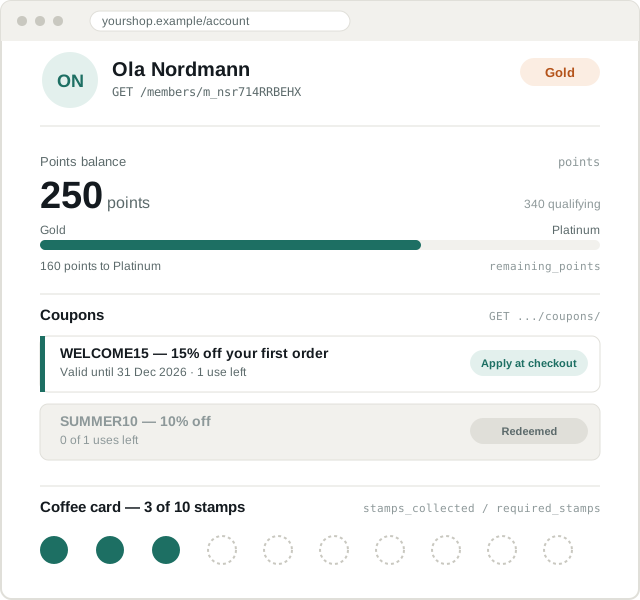
Every number on this mockup is the exact example from
Core concepts — points: 250,
qualification_points: 340, remaining_points: 160, level_title: "Gold",
next_level_points: 500 — so you can check your own rendering against it
field by field.
The data
Section titled “The data”One call gets almost everything:
GET /api/v2.0/stores/{storeId}/members/{memberId}Plus coupons, if you are showing them:
GET /api/v2.0/stores/{storeId}/members/{memberId}/coupons/What to show
Section titled “What to show”| Display | Source | Watch out |
|---|---|---|
| Points balance | membership_detail.points | Not remaining_points — see below |
| Tier | membership_detail.level_title | May be null if the store has no tiers |
| Points to next tier | membership_detail.remaining_points | Can go negative; at or below zero means reached |
| Progress bar | qualification_points vs next_level_points | Not points |
| Tier expiry | membership_detail.level_expire_date | Often null |
| Coupons | GET /coupons/ | Filter out spent ones; unlimited ones have no count |
| Stamp progress | stamps_collected / required_stamps |
Progress to the next tier
Section titled “Progress to the next tier”const { qualification_points, remaining_points, next_level_points, level_title, next_level_title,} = member.membership_detail;
const atTopTier = !next_level_title || next_level_points <= 0;
const progress = atTopTier ? null : Math.min(100, Math.round((qualification_points / next_level_points) * 100));
const caption = atTopTier ? level_title : remaining_points > 0 ? `${remaining_points} points to ${next_level_title}` // "160 points to Platinum" : `${next_level_title} reached`;At the top tier there is no next level: next_level_title is empty and
next_level_points is 0. Hide the bar rather than dividing by zero.
Filtering coupons
Section titled “Filtering coupons”Compare dates in the store’s timezone (time_zone on the store
object), not your server’s. A coupon expiring “today” means today where the
shop is.
valid_from and valid_to carry no offset — they are the store’s local
time. Passing them to new Date() would read them in your server’s
timezone instead, so compare them as strings against the current time in
the store’s timezone:
// The current store-local time, in the same format as valid_from / valid_to.function storeNow(timeZone) {  return new Intl.DateTimeFormat('sv-SE', {    timeZone,    year: 'numeric', month: '2-digit', day: '2-digit',    hour: '2-digit', minute: '2-digit', second: '2-digit',    hourCycle: 'h23',  }).format(new Date()).replace(' ', 'T');}
const UNLIMITED = 10_000_000; // what an unlimited coupon carries on a member's list
const now = storeNow(store.time_zone); // e.g. "2026-09-10T12:30:00"
const usable = coupons  .filter(c => c.valid_from <= now && c.valid_to >= now)  .map(c => ({    ...c,    usesLeft: c.max_redemptions >= UNLIMITED ? null : c.max_redemptions - c.times_redeemed,  }))  .filter(c => c.usesLeft === null || c.usesLeft > 0);
usesLeft: null means unlimited — show no count at all, or the customer
reads “9,999,999 uses left”.
- Don’t trust a member id from the browser. Resolve it from the server-side session. If the client can pass a member id, a customer can read someone else’s points and coupons by changing a number.
- Don’t cache the panel across sessions. Points change on every purchase, and a stale balance is a support ticket.
- Don’t block page render on Diller. Load the panel asynchronously and degrade to nothing if the call fails or times out. See degrading gracefully.
- Don’t show
is_visible_to_follower: falsesegments. The merchant marked those internal on purpose.
The shortcut: embed our hosted page
Section titled “The shortcut: embed our hosted page”If you do not want to build this at all:
GET /api/v2.0/stores/{storeId}/members/{memberId}/widgets/profile{ "details_url": "https://diller.app/member/widgets/profile/?token=..." }Drop that in an iframe. The URL is signed and expires in about 15 minutes, so fetch it per page render and never cache it.
Good for getting a merchant live quickly; replace it with your own UI when you want it to match your storefront.
See also: Core concepts, Members reference.