
Signup and login
Your webshop already has customer accounts. We have members. The whole integration rests on keeping those two in step: creating a member when a customer joins, and finding the right member when a customer logs in.
What this looks like
Section titled “What this looks like”There is no required UI — the form below is one reasonable layout, built
from the same example member we use throughout. Every field maps
to something in the Flow A
request body; the two segment questions come straight from the
GET /segments example in Core concepts.
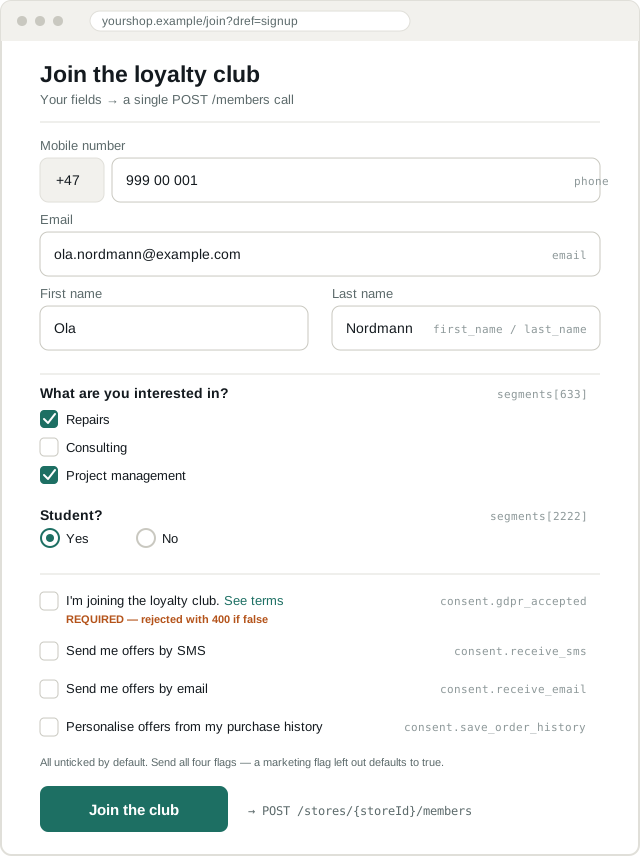
A few things this mockup is deliberately explicit about:
- Every consent box starts unticked. A pre-ticked box is not consent.
- One box per consent flag. Joining the club maps to
consent.gdpr_acceptedand is required. SMS and email are separate boxes because they are separate flags, and you must send both — a flag you leave out of the create request defaults totrue. Our consent section covers all four. - The segment checkboxes and radio are rendered from
GET /segments, not hardcoded — this mockup shows the specific options from that chapter’s example response, but your form should render whatever the merchant has configured. - The terms link should point at the store’s own
privacy_policy_url, not a static page — see consent.
The rule: your customer record owns the link
Section titled “The rule: your customer record owns the link”Store the Diller member_id on your own customer record. That is the join.
your_customers id 42 email ola@example.com phone +4799900001 diller_member_id m_nsr714RRBEHX <-- add this columnEverything below exists to populate that column correctly, and to recover when it is empty.
Do not re-derive the member on every request by searching on phone or email. Search is for the moment of linking; after that you have the id.
Which create call?
Section titled “Which create call?”There are two ways to create a member and they are not interchangeable.
POST /members | POST /members/enroll | |
|---|---|---|
| Use when | You collected consent on your own form | You only have a phone number |
| Sends | phone, profile, consent | phone, department_id |
| Result | Member is active immediately | Activation link sent by SMS; member inactive until they accept |
| Requires | consent.gdpr_accepted: true | — |
| Typical caller | Webshop signup form | POS, or a phone-only capture |
For a webshop, use POST /members. Your signup form shows the terms and
the consent checkboxes, so consent is already given — there is nothing for
an SMS activation step to add, and sending one makes the customer complete
signup twice.
POST /members/enroll matters to you in one situation: a customer who was
signed up in a physical store and is now finishing on your site. That is the
activation token flow.
Flow A — new customer registers on your webshop
Section titled “Flow A — new customer registers on your webshop”The common case. The customer fills in your form, which includes the loyalty consent checkboxes, and you create the member as part of account creation.
Search before you create. The customer may already be a member from an
in-store visit. Skipping the search means a duplicate attempt, which we
reject with 400 “Member with phone number ending in 0001 is already
registered for this store”.
The request
Section titled “The request”POST /api/v2.0/stores/{storeId}/members HTTP/1.1Authorization: Bearer {token}Content-Type: application/json{ "phone": { "country_code": "+47", "number": "99900001" }, "first_name": "Ola", "last_name": "Nordmann", "email": "ola.nordmann@example.com", "birth_date": "1988-04-12T00:00:00", "gender": "NotShared", "address": { "street": "Karl Johans gate 3", "city": "Oslo", "zip_code": "0154", "state": null, "country_code": "NO" }, "department_ids": ["101"], "consent": { "gdpr_accepted": true, "save_order_history": true, "receive_sms": true, "receive_email": false }, "segments": [ { "segment_id": 633, "selected_options": [4101, 4103] }, { "segment_id": 2222, "selected_options": [5001] } ], "origin": { "system_id": "my-webshop", "employee_id": null, "department_id": "101", "channel": "OnlineStore" }}Only phone is required by the schema, but we also validate
first_name, last_name and consent as non-empty, and email as a
valid address when present. address.country_code must be a valid ISO
alpha-2 code.
Always send receive_sms and receive_email, set from the customer’s own
answers. Leave either out and it takes the value of gdpr_accepted —
true — which opts the member in to marketing without their say-so.
Letting the customer into the Diller member portal
Section titled “Letting the customer into the Diller member portal”POST /members also accepts a password, so the customer can later log in
to our member pages:
{ "password": "Sommer2026", "repeat_password": "Sommer2026"}Rules: at least 8 characters, at most 64, must include uppercase and numbers. Both fields must match. They are write-only and never returned.
Only send these if you are surfacing the member portal to customers. Otherwise leave them out — you do not want to invent and discard passwords.
Flow B — existing customer logs in
Section titled “Flow B — existing customer logs in”On login, ensure the account is linked. If diller_member_id is already
set, you are done — no call to us needed.
Searching
Section titled “Searching”GET /api/v2.0/stores/{storeId}/members/search?phone=%2B4799900001Supply exactly one of these parameters:
| Parameter | Use for |
|---|---|
phone | The primary lookup. International format, +47… or 0047… |
email | Secondary lookup |
identifierValue | Your own customer id — see below |
cardIdentifier | A loyalty card linked to the member |
activationToken | Completing an in-store signup (Flow C) |
If you send a national-format number, we assume the store’s own country.
Send international format and remove the ambiguity — and encode it: a raw
+ in a query string is read as a space, so +4799900001 must go out as
%2B4799900001. encodeURIComponent does this, as below.
Linking by your own customer id
Section titled “Linking by your own customer id”Phone numbers change. A sturdier link is to store your customer id inside Diller, so either side can find the other.
POST /api/v2.0/stores/{storeId}/members/{memberId}/identifiersContent-Type: application/json{ "type_id": 1, "value": "42" }Read it back with:
GET /api/v2.0/stores/{storeId}/members/search?identifierValue=42The identifier type is configured per store — GET /stores/{storeId}
returns member_identifier, describing the type the merchant has set up. Ask
us to configure one for your integration if the merchant has none.
Flow C — finishing a signup started in store
Section titled “Flow C — finishing a signup started in store”A customer joined at the till. We send them an SMS with an activation link. The link brings them to your site to finish, carrying a token:
https://yourshop.example/join?dref=signup&token=996405d26e29Two things to get right:
- The phone number is already fixed. Show it, do not let them edit it
here.
PUT /members/{memberId}has nophonefield — changing a number goes throughreset-phone, which is a separate verified flow. - A used or unknown token must fail gracefully. Tokens are cleared once consumed. If the search returns an empty array, show your normal signup form rather than an error page.
Guest checkout
Section titled “Guest checkout”Someone buys without an account, and your checkout offers to join the loyalty club.
Two honest options:
They tick the consent boxes — create the member with POST /members,
then post the transaction against the new member id. They get points for
the order they just placed.
They do not tick the boxes — post nothing to us. There is no member and no consent, so there is nothing to attach the order to. Do not create a member “just in case”; that is exactly the thing consent law exists to prevent.
Keeping profiles in sync
Section titled “Keeping profiles in sync”When a customer edits their details on your site, mirror it to us.
PUT /api/v2.0/stores/{storeId}/members/{memberId}PUT treats a field you leave out differently depending on the field:
| Left out of the body | Result |
|---|---|
first_name, last_name, email, birth_date, gender | Kept |
address, department_ids, segments | Cleared |
consent.receive_sms, consent.receive_email | Set to false |
So read the member first, and build the update body from it — field by
field, not by sending the GET response back. Segments in particular come
back in a read shape keyed by id, and PUT wants them keyed by
segment_id. Sending the read shape returns 400 “Segment ids are
duplicated.”
const current = await (await dillerFetch(  `/api/v2.0/stores/${storeId}/members/${memberId}`)).json();
const toSegmentAnswer = (s) =>  s.type === 'Text' || s.type === 'DateTime'    ? { segment_id: s.id, value: s.value }    : { segment_id: s.id, selected_options: s.selected_options };
const updated = {  first_name: current.first_name,  last_name: current.last_name,  email: newEmail,  birth_date: current.birth_date,  gender: current.gender,  address: { ...current.address, street: newStreet },  department_ids: current.department_ids,  segments: current.segments.map(toSegmentAnswer),  consent: current.consent, // all four flags, so neither marketing flag drops to false  origin: { system_id: 'my-webshop', department_id: '101', channel: 'OnlineStore' },};
await dillerFetch(`/api/v2.0/stores/${storeId}/members/${memberId}`, {  method: 'PUT',  body: JSON.stringify(updated),});
There is no phone in the body — PUT does not accept one.
Changing a phone number is a different operation — see Members reference.
Member lifecycle
Section titled “Member lifecycle”Unsubscribed is not deleted. Turning off receive_sms and
receive_email stops marketing; the member keeps their points, coupons and
history. Only DELETE removes them, and even then they are marked and
purged after ten days rather than erased on the spot.
Checklist
Section titled “Checklist”-
diller_member_idcolumn on your customer record - Search before create, on every signup
- Handle the empty-array miss, not just the HTTP status
-
consent.gdpr_accepted: true, from a real checkbox the customer ticked -
receive_smsandreceive_emailsent explicitly on create, from the customer’s answers -
origin.channel: "OnlineStore"on every call - Segment form rendered from
GET /segments, not hardcoded -
PUTbuilt from a fresh read: both marketing flags, address, departments, and segments mapped tosegment_id - Never enrol on login without an explicit opt-in
- The merchant’s terms and
privacy_policy_urlshown at the point of consent